RubyGems 9.9.9 packaged – Fake install RubyGems on Debian/Ubuntu

For a lot of reasons I often rely on a mixture of a Debian/Ubuntu pre packaged Ruby with a self compiled RubyGems. It helps you in situations where you don’t care that much about the Ruby interpreter itself but need an up to date RubyGems. While this is easy to install, you might run into trouble when installing packages that depend on Ruby and RubyGems, namely packages like “rubygems”, “rubygems1.8″ and “rubygems1.9″.

After unsuccessfully playing around with dpkg for a while (you can put packages on “hold” which prevents them from being installed automatically, I came to the conclusion, the best way is to install a fake package that is empty but satisfies depencies.

So, here it is: The shiny new RubyGems 9.9.9 which delivers rubygems, rubygems1.8 and rubygems1.9 right away. Just install it (e.g. with dpkg) and you’ll be able installing packages that rely on a rubygems package.

In case you want to play around with the package and customize it to your needs, e.g. only deliver rubygems1.8 or rubygems1.9, take

1. Install equivs

$ sudo apt-get install equivs

2. create a control file

$ equivs-control rubygems

3. edit the control file

$ vim rubygems

You can compare the default settings in the control file with the output of e.g. “apt-cache show rubygems”. The crucial field is “Provides:” where you can put a comma separated list of packages you want to fake install. Choose a high version for  there “Version: ” field as this will mark the package newer as the distribution’s own package. This prevents the packager from replacing it.

Section: universe/interpreters
Priority: optional
Homepage: http://www.screenage.de/blog/
Standards-Version: 3.6.2
 
Package: rubygems
Version: 9.9.9
Maintainer: Caspar Clemens Mierau <ccm@screenage.de>
Provides: rubygems1.8,rubygems1.9,rubygems
Architecture: all
Description: Fake RubyGems replacement
 This is a fake meta package satisfying rubygems dependencies.
 .
 This package can be used when you installed a packaged ruby but want
 to use rubygems from source and still rely on software that depends
 on ruby and rubygems

4. build the package

$ equivs-build rubygems

p.s.: You can also use equivs for easily building meta packages containing a list of packages you want to install at a glance, e.g. for semi automated server bootstrapping.

Bootstrapping a Puppet agent/master on Ubuntu

Though it’s really great that Puppet made it into Ubuntu’s main repository, the provided version is rather outdated which prevents you from using advanced language features when writing your manifests. So sooner or later you end up installing Puppet manually. In order to speed up installation I stripped it down to the following:

install agent:

$ bash &lt; &lt;(wget -qO - https://bit.ly/install-puppet-agent)

install master:

$ bash &lt; &lt;(wget -qO - https://bit.ly/install-puppet-master)

The call fetches the most recent version of the install script from github, installs Ubuntu’s Ruby (which is good enough for running Puppet), fetches an upstream version of gem itself and updates it to the most recent version and finally installs the Puppet gem.

You can, of course, also download, review and run the scripts manually. Just have a look at https://github.com/moviepilot/puppet/tree/master/tools

slides from the ‘From MySQL to MariaDB’ presentation

As announced, I held a short talk on switching from MySQL community edition (especially 5.1) to MariaDB (currently 5.2.6) at this years LinuxTag in Berlin.

Here are the (German) slides for reference:

(In case you cannot see the embedded presentation, you can also click here)

Please note: There are a lot of good English slides around. If you want give a talk on MariaDB, the “Beginner’s Guide” might be a good start:

A Beginner’s Guide to MariaDB Presentation

Short talk on MariaDB at Linuxtag 2011

If you happen to be around at this years LinuxTag 2011 in Berlin/Germany, you are invited to attend my short talk on MariaDB as a drop-in replacement for MySQL. The talk focusses on differences between MySQL Community Edition and MariaDB (e.g. XtraDB, Aria, userstats), shows some features live and explains how to switch. I’ll probably post the slides here afterwards.

The talk will be held in German and is scheduled for Friday, the 13th of May, 16:30. The official announcement can be found here.

Using backuppc as a dirty distributed shell

Backuppc is a neat server-based backup solution. In Linux envorinments it is often used in combination with rsync over ssh – and, let’s be hontest – often fairly lazy sudo or root rights for the rsync over ssh connection. This has a lot of disadvantages, but at least, you can use this setup as a cheap distributed shell, as a good maintained backuppc server might have access to a lot of your servers.

I wrote a small wrapper, that reads the (especially Debian/Ubuntu packaged) backuppc configuration and iterates through the hosts, allowing you to issue commands on every valid connection. I used it so far for listing used ssh keys, os patch levels and even small system manipulations.

1
2
3
4
5
6
7
8
9
10
11
12
13
14
#!/bin/bash
SSH_KEY="-i /var/lib/backuppc/.ssh/id_rsa"
SSH_LOGINS=( `grep "root" /etc/backuppc/hosts | \
 awk '{print "root@"$1" "}' | \
 sed ':a;N;$!ba;s/\n//g'` )
 
for SSH_LOGIN in "${SSH_LOGINS[@]}"
do
 HOST=`echo "${SSH_LOGIN}" | awk -F"@" '{print $2'}`
 echo "--------------------------------------------"
 echo "checking host: ${HOST}"
 ssh -C -qq -o "NumberOfPasswordPrompts=0" \
 -o "PasswordAuthentication=no" ${SSH_KEY} ${SSH_LOGIN} "$1"
done

You can easily change this to your needs (e.g. changing login user, adding sudo and so on).

$ ./exec_remote_command.sh "date"
--------------------------------------------
checking host: a.b.com
Mo 9. Mai 15:40:26 CEST 2011
--------------------------------------------
checking host: b.b.com
[...]

Make sure to quote your command, especially when using commands with options, so the script can handle the command line as one argument.

A younger sister of the script is the following ssh key checker that lists and sorts the ssh keys used on systems by their key comment (feel free to include the key itself):

1
2
3
4
5
6
7
8
9
10
11
12
13
14
15
16
17
18
19
20
21
22
#!/bin/bash
 
SSH_KEY="-i /var/lib/backuppc/.ssh/id_rsa"
SSH_LOGINS=( `grep "root" /etc/backuppc/hosts | \
 awk '{print "root@"$1" "}' | \
 sed ':a;N;$!ba;s/\n//g'` )
 
for SSH_LOGIN in "${SSH_LOGINS[@]}"
do
 HOST=`echo "${SSH_LOGIN}" | awk -F"@" '{print $2'}`
 echo "--------------------------------------------"
 echo "checking host: ${HOST}"
 ssh -C -qq -o "NumberOfPasswordPrompts=0" \
 -o "PasswordAuthentication=no" ${SSH_KEY} ${SSH_LOGIN} \
 "cut -d: -f6 /etc/passwd | xargs -i{} egrep -s \
 '^ssh-' {}/.ssh/authorized_keys {}/.ssh/authorized_keys2" | \
 cut -f 3- -d " " | sort
 ssh -C -qq -o "NumberOfPasswordPrompts=0" \
 -o "PasswordAuthentication=no" ${SSH_KEY} ${SSH_LOGIN} \
 "egrep -s '^ssh-' /etc/skel/.ssh/authorized_keys \
 /etc/skel/.ssh/authorized_keys2" | cut -f 3- -d " " | sort
done

A sample output of the script:

$ ./check_keys.sh 2>/dev/null
--------------------------------------------
checking host: a.b.com
ccm@host1.key
backuppc@localhost
some random key comment
--------------------------------------------
checking host: b.b.com
[...]

That’s all for now. Don’t blame me for doing it this way – I am only the messenger :)

My Mom Runs Ubuntu – Update for Ada Lovelace Day

Just a couple of days ago I wrote update the upcoming “Ada Lovelace Day” – celebrating women in technology on the 24nd of March, which happens to be today. The day pledges for blog posts about this topic and here we go with an Ubuntu flavored version.

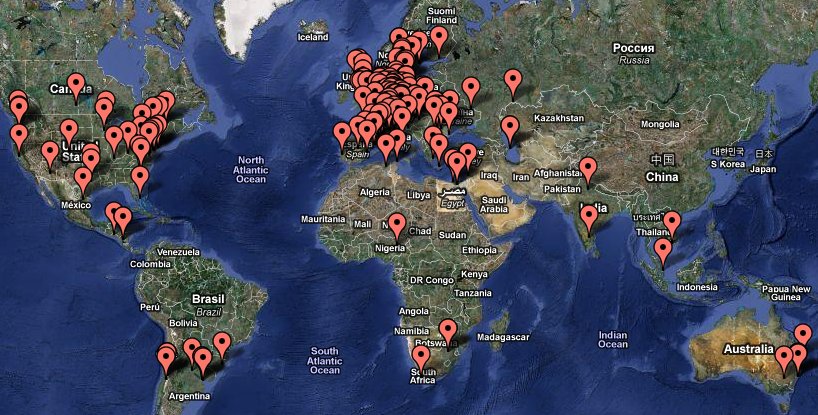
At Ubucon 2008 in Göttingen, a German Ubuntu User Conference, I noticed that a lot people hanging around discussed how nicely their parents and especially moms are using Ubuntu. No hazzle, no further explanations needed – it just worked. And often they don’t even know or notice that they are using Ubuntu, as they just standard software like Firefox and Thunderbird. As this user group doesn’t belong to the tweeting, facebooking, social web society, I decided to found a launchpad group named “My Mum Runs Ubuntu“, that has no further meaning than joining it means your mother runs Ubuntu – a simple way of giving this “silent” user group at least a number and a marker on a map.

I was surprised how fast the member list grew and happy to see that it’s members came and come from all over the world as you can see below:

"My Mom Runs Ubuntu" global map (map by Google)

"My Mom Runs Ubuntu" global map (map by Google)

So this is not about a single heroine in technology – it is about a general movement:  I am convinced, especially Ubuntu with it’s focus on an intuitive interface seems to keep the entry level very low and therefore attracts user groups that might be a suprprise for a lot of people. I know dozens of techie people stating that free operating systems are way too complicated to use for them. When telling about “My Mom Runs Ubuntu” they run out of reasons. At least there is nothing more convincing on using free software than people that are just using it on a daily basis without the need of telling everybody as they just take it as normal. I am sure, this user group continues to grow and am

So, if you already have a Launchpad account and your mum runs Ubuntu, too, give her a voice by just joining the group.

And if you think, this post misses real techie heroines, check the “Ubuntu Women” project, featuring some of the most active members of the Ubuntu community.

Ada Lovelace Day Logo

Ada Lovelace Day Logo

Ada Lovelace Day on 24nd of March

Ada Lovelace

Ada Lovelace

On the 24nd of March – next Wednesday – the “Ada Lovelace Day” is taking place. If you don’t know Ada Lovelace so far – you should: She lived in the early 19th century, and is known today especially for her work on Charles Babbage’s early mechanical general-purpose computer, the analytical engine. Ada is regarded not only as the first female programmer, she is actually regarded as the world’s first computer programmer.

The “Ada Lovelace Day” celebrates the achievements of women in technology and science and pledges for blog posts about this topic. As the Ubuntu community tries to emphasize the involvement of women in the contribution to the project (e.g. see Ubuntu Women), there might interesting stories about an Ubuntu specific focus on this day’s topic.

I am looking forward the 24nd, there are over 1000 blog post pledges so far. In case you use twitter, have a look at the hash marks #AdaLovelace and #ald10.

GNU Emacs workshop at c-base / Berlin

Emacs? Emacs! I proudly announce the first Emacs workshop held by the incredible Anselm Helbig (also known as “mnemonikk”), starting next Monday, the 22nd of March at c-base/Berlin/Germany. If you ever wanted to start using Emacs as an advanced editor and development environment, this is the right kick off workshop for you. Anselm is ready to answer all your questions regarding installation, configuration, usage and programming of the GNU Emacs editor. The focus of the workshop is a hands on experience rather than a lecture.

A detailed German description of the workshop can be found in Anselm’s blog. The workshop is free of charge.

When backups fail: A mysql binlog race condition

Today I ran into my first MySQL binlog race condition: The initial problem was quite simple: A typical MySQL master->slave setup with heavy load on the master and nearly no load on the slave, which only serves as a hot fallback and job machine, showed differences on the same table on both machines. The differences showed up from time to time: entries that have been deleted from the master were still on the slave.

After several investigations I started examining the MySQL binlog from the master – a file containing all queries that will be transferred to the slave (and executed there if they don’t match any ignore-db-pattern). I grepped for ids of rows that have not been deleted on the slave as I’s interested if the DELETE statement was in the binlog. In order to read a binlog file just use “mysqlbinlog” and parse the output with grep, less or similar. To my surprise I found the following entries:

$ mysqlbinlog mysql-complete-bin.000335 | grep 1006974
DELETE FROM `tickets` WHERE `id` = 1006974
SET INSERT_ID=1006974/*!*/;

As “SET INSERT_ID” is a result of an INSERT statement it was clear, that MySQL wrote the INSERT => DELETE statements in the wrong order. As INSERT/DELETE sometimes occur quite fast after each other and several MySQL  threads are open in the same MySQL server, you might run into a rare INSERT/DELETE race condition as the master successfully executes them, while the slave receives them in the wrong order.

As a comparision this is a normal order of INSERT and DELETE (please note that the actual INSERT is not displayed here):

$ mysqlbinlog mysql-complete-bin.000336 | grep 1007729<br />SET INSERT_ID=1007729/*!*/;<br />DELETE FROM `tickets` WHERE `id` = 1007729<br />

Actually this all so far. Lesson learned for me: A mysql binlog might get you into serious trouble when firing a MySQL server with INSERT and DELETE on the same rows as the linear binlog file can fail the correct statement order, which might be a result of different MySQL threads and an unclean log behavior. I have not yet found a generic solution for the problem but I am looking forward to it.

Ubuntu Karmic Koala and Ubuntu Berlin enter metro system again

Once again, “Berliner Fenster“, the company behind the Berlin inside metro tv advertising system was so kind to provide the Ubuntu Berlin Karmic Koala release party at c-base and the release of Ubuntu with it’s own spot. It  will be shown for three days from 29th to 31th this month every 15 minutes on hundreds of screens viewable by more than a million passengers:

If you cannot see the embedded spot, click on this link.

It’s really nice to have this great audience-appealing support once again, as it presents Ubuntu in a totally non-techie medium, reaching an audience that is hard to reach and that has time to consume  input – as the screens inside the metro trains are quite appealing.

I’ll see if I can post some real life pictures of the spot soon.